Building a RAG Application with Spring AI, Java 21, and Maven
A production-minded walkthrough of document ingestion, token-aware splitting, embeddings, vector retrieval, prompt augmentation, REST delivery, tests, and operational safeguards.
- Author
- Abubakar Saifullah
- Published
- Published
- Updated
- Updated
- Reading time
- 13 minute read
Retrieval-Augmented Generation, usually shortened to RAG, adds relevant private or domain-specific information to a model request before the model writes an answer. Instead of asking the model to rely only on its training data, the application searches a controlled knowledge base, retrieves the best matching passages, and places those passages in the prompt as evidence.
This is a complete Spring AI RAG example rather than a fragment: one Maven project that ingests a document, embeds it, retrieves the closest passages, and answers a question over a REST endpoint. Every file is shown, and the same project runs against either OpenAI or a local Ollama model without a code change.
What RAG solves
RAG is useful when answers must be grounded in content that changes independently of the model: product documentation, operating procedures, policies, support material, engineering standards, or an internal knowledge base. It can reduce unsupported answers, but it does not guarantee correctness. Retrieval quality, document quality, prompt design, model behaviour, and application controls all matter.
- Freshness: update the knowledge base without retraining a model.
- Control: choose which documents and metadata are eligible for retrieval.
- Traceability: preserve document identifiers and source metadata for later citation or audit work.
- Separation of concerns: treat ingestion, retrieval, generation, and API delivery as replaceable components.
Architecture and request flow
| Flow | Stages | Purpose |
|---|---|---|
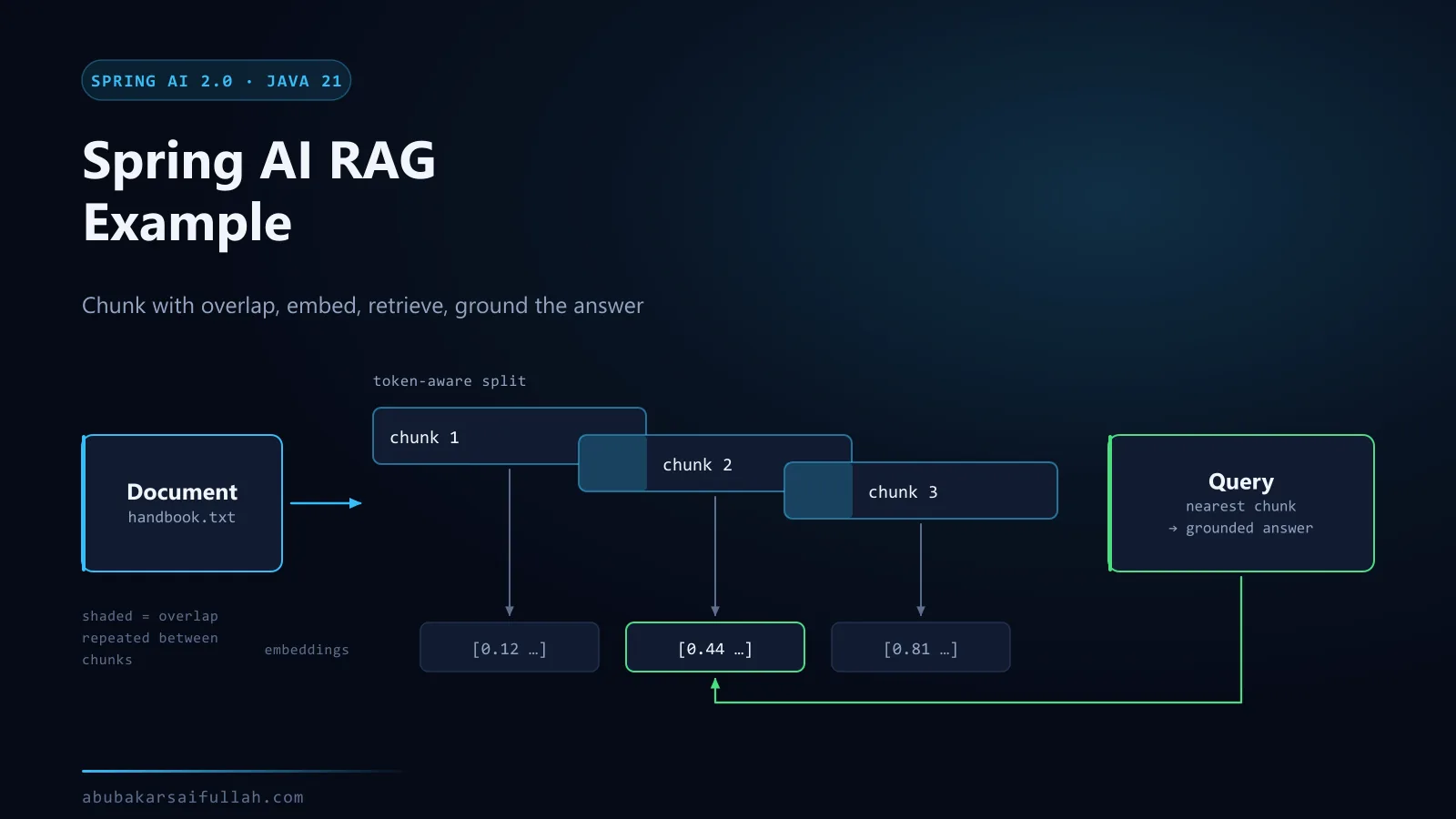
| Ingestion | Load document -> split text -> create embeddings -> store vectors and metadata | Prepare searchable knowledge before user requests arrive |
| Question answering | Receive question -> embed query -> similarity search -> augment prompt -> call chat model -> return answer | Ground the generated answer in retrieved passages |
Spring AI's QuestionAnswerAdvisor implements the common retrieval-and-augmentation step. For each request it searches the configured VectorStore, appends retrieved context to the user input, and then delegates to the chat model. The application still owns document ingestion, API validation, error handling, security, and the choice of a durable production store.
Prerequisites
- JDK 21 with
java -versionconfirming the active runtime. - Maven 3.9 or newer.
- Either an OpenAI API key in the
OPENAI_API_KEYenvironment variable, or Ollama (opens in a new tab) running locally. The project supports both and switching between them is a profile flag. - A plain-text knowledge file. The example places it at
src/main/resources/knowledge/company-handbook.txt. - A deliberate choice about which information is safe to send to the selected model provider. If the answer is "none of it", use the local-model path described below.
Project setup and Maven dependencies
Create a standard Spring Boot Maven project. The Spring AI BOM keeps all Spring AI modules on one compatible version. The OpenAI starter supplies the chat and embedding model integrations; the vector-store and advisor modules provide the in-memory store and RAG advisor used below.
<?xml version="1.0" encoding="UTF-8"?>
<project xmlns="http://maven.apache.org/POM/4.0.0"
         xmlns:xsi="http://www.w3.org/2001/XMLSchema-instance"
         xsi:schemaLocation="http://maven.apache.org/POM/4.0.0 https://maven.apache.org/xsd/maven-4.0.0.xsd">
    <modelVersion>4.0.0</modelVersion>

    <parent>
        <groupId>org.springframework.boot</groupId>
        <artifactId>spring-boot-starter-parent</artifactId>
        <version>4.1.1</version>
        <relativePath/>
    </parent>

    <groupId>com.example</groupId>
    <artifactId>rag-service</artifactId>
    <version>0.0.1-SNAPSHOT</version>
    <name>rag-service</name>

    <properties>
        <java.version>21</java.version>
        <spring-ai.version>2.0.1</spring-ai.version>
    </properties>

    <dependencyManagement>
        <dependencies>
            <dependency>
                <groupId>org.springframework.ai</groupId>
                <artifactId>spring-ai-bom</artifactId>
                <version>${spring-ai.version}</version>
                <type>pom</type>
                <scope>import</scope>
            </dependency>
        </dependencies>
    </dependencyManagement>

    <dependencies>
        <dependency>
            <groupId>org.springframework.boot</groupId>
            <artifactId>spring-boot-starter-webmvc</artifactId>
        </dependency>
        <dependency>
            <groupId>org.springframework.boot</groupId>
            <artifactId>spring-boot-starter-validation</artifactId>
        </dependency>
        <dependency>
            <groupId>org.springframework.ai</groupId>
            <artifactId>spring-ai-starter-model-openai</artifactId>
        </dependency>
        <dependency>
            <groupId>org.springframework.ai</groupId>
            <artifactId>spring-ai-starter-model-ollama</artifactId>
        </dependency>
        <dependency>
            <groupId>org.springframework.ai</groupId>
            <artifactId>spring-ai-vector-store</artifactId>
        </dependency>
        <dependency>
            <groupId>org.springframework.ai</groupId>
            <artifactId>spring-ai-vector-store-advisor</artifactId>
        </dependency>

        <dependency>
            <groupId>org.springframework.boot</groupId>
            <artifactId>spring-boot-starter-webmvc-test</artifactId>
            <scope>test</scope>
        </dependency>
    </dependencies>

    <build>
        <plugins>
            <plugin>
                <groupId>org.springframework.boot</groupId>
                <artifactId>spring-boot-maven-plugin</artifactId>
            </plugin>
        </plugins>
    </build>
</project>
A maintainable package layout keeps transport, configuration, ingestion, and application logic separate:
src/main/java/com/example/ragservice/
├── RagServiceApplication.java
├── config/
│   ├── RagConfiguration.java
│   └── RagProperties.java
├── knowledge/
│   └── KnowledgeBaseLoader.java
├── rag/
│   └── RagService.java
└── web/
    ├── ApiError.java
    ├── GlobalExceptionHandler.java
    ├── RagController.java
    ├── RagRequest.java
    └── RagResponse.java

src/main/resources/
├── application.yml
└── knowledge/company-handbook.txt
Required configuration
Use environment-backed secrets and keep tunable retrieval settings under an application-specific prefix. The model names below are explicit so a provider default cannot change behaviour silently. Choose models that are available to your account and revalidate them when upgrading.
spring:
  application:
    name: rag-service
  ai:
    # Provider selection. Both the OpenAI and Ollama starters are on the classpath,
    # and these two properties decide which auto-configuration activates.
    # Default profile  -> OpenAI (hosted).
    # "ollama" profile -> Ollama (local). Run with --spring.profiles.active=ollama
    model:
      chat: openai
      embedding: openai
    openai:
      api-key: ${OPENAI_API_KEY}
      chat:
        model: ${OPENAI_CHAT_MODEL:gpt-4.1-mini}
        temperature: 0.1
      embedding:
        model: ${OPENAI_EMBEDDING_MODEL:text-embedding-3-small}
    retry:
      max-attempts: 3
      backoff:
        initial-interval: 1s
        multiplier: 2
        max-interval: 10s

app:
  rag:
    knowledge: classpath:/knowledge/company-handbook.txt
    chunk-size: 800
    min-chunk-size-chars: 200
    top-k: 5
    similarity-threshold: 0.70

server:
  shutdown: graceful

---
# Local models through Ollama. No API key and no outbound network call.
# Pull both models once before starting:
#   ollama pull llama3.1
#   ollama pull nomic-embed-text
spring:
  config:
    activate:
      on-profile: ollama
  ai:
    model:
      chat: ollama
      embedding: ollama
    # The OpenAI auto-configuration is inactive on this profile, so no key is needed.
    # This placeholder only stops the unresolved ${OPENAI_API_KEY} reference above
    # from failing startup when the variable is not set at all.
    openai:
      api-key: not-used-on-the-ollama-profile
    ollama:
      base-url: ${OLLAMA_BASE_URL:http://localhost:11434}
      chat:
        model: ${OLLAMA_CHAT_MODEL:llama3.1}
        temperature: 0.1
      embedding:
        model: ${OLLAMA_EMBEDDING_MODEL:nomic-embed-text}
      init:
        # Keep startup predictable: fail with a clear Ollama error if a model is
        # missing rather than silently downloading gigabytes on first request.
        pull-model-strategy: never

app:
  rag:
    # Local embedding models are smaller and benefit from a slightly lower bar.
    similarity-threshold: 0.60
Add a small knowledge document so the first request has something concrete to retrieve. Replace this sample with content your application is authorised to use:
Support requests are submitted through the service portal.
Include a concise description, the affected service, the observed impact,
and steps to reproduce the problem.

Mark an incident as critical only when a production service is unavailable
or a severe security issue is suspected. For a critical incident, submit the
service-portal request and contact the on-call engineer through the approved
incident channel.Switch between OpenAI and a local Ollama model
The configuration above declares both providers, and no Java code changes when you switch. That matters for RAG in particular: ingestion sends every chunk of your knowledge base to an embedding provider, and sending internal documents to a hosted API is often the thing that blocks a project.
Two properties do the work:
| Property | Values | Selects |
|---|---|---|
spring.ai.model.chat | openai, ollama | Which chat auto-configuration activates |
spring.ai.model.embedding | openai, ollama | Which embedding auto-configuration activates |
Both the OpenAI and Ollama starters are on the classpath. Each provider's auto-configuration is annotated with @ConditionalOnProperty against these keys, so exactly one activates. OpenAI is the default when the property is absent; the ollama profile overrides both to ollama. The inactive provider never opens a connection and never needs credentials.
Run on OpenAI
export OPENAI_API_KEY=sk-your-key
mvn spring-boot:run
Run on a local model
Install Ollama (opens in a new tab), then pull one chat model and one embedding model. A chat model cannot produce embeddings, so both are required.
ollama pull llama3.1
ollama pull nomic-embed-text
ollama list
Start the application on the ollama profile. No API key is needed and no request leaves the machine.
mvn spring-boot:run -Dspring-boot.run.profiles=ollamaThe same switch works for a packaged jar, which is what you would use in a container:
java -jar target/rag-service-0.0.1-SNAPSHOT.jar --spring.profiles.active=ollamaOverride a model name without editing configuration:
OLLAMA_CHAT_MODEL=qwen2.5 mvn spring-boot:run -Dspring-boot.run.profiles=ollamaExpect different retrieval behaviour rather than identical results. Local embedding models are smaller and score similarity on a different scale, which is why the ollama profile lowers similarity-threshold from 0.70 to 0.60. Treat both numbers as starting points and tune them against your own questions.
Application entry point and typed properties
package com.example.ragservice;

import org.springframework.boot.SpringApplication;
import org.springframework.boot.autoconfigure.SpringBootApplication;
import org.springframework.boot.context.properties.ConfigurationPropertiesScan;

@SpringBootApplication
@ConfigurationPropertiesScan
public class RagServiceApplication {

    public static void main(String[] args) {
        SpringApplication.run(RagServiceApplication.class, args);
    }
}package com.example.ragservice.config;
import org.springframework.boot.context.properties.ConfigurationProperties;
import org.springframework.core.io.Resource;
@ConfigurationProperties("app.rag")
public record RagProperties(
Resource knowledge,
int chunkSize,
int minChunkSizeChars,
int topK,
double similarityThreshold
) {
}Embeddings and vector storage
An embedding model converts document chunks and user queries into numerical vectors. Similarity search compares those vectors so semantically related text can be retrieved even when the wording is not identical. The OpenAI starter auto-configures an EmbeddingModel; the following bean connects it to SimpleVectorStore.
package com.example.ragservice.config;

import org.springframework.ai.chat.client.ChatClient;
import org.springframework.ai.chat.client.advisor.vectorstore.QuestionAnswerAdvisor;
import org.springframework.ai.embedding.EmbeddingModel;
import org.springframework.ai.vectorstore.SearchRequest;
import org.springframework.ai.vectorstore.SimpleVectorStore;
import org.springframework.ai.vectorstore.VectorStore;
import org.springframework.context.annotation.Bean;
import org.springframework.context.annotation.Configuration;

@Configuration
public class RagConfiguration {

    @Bean
    VectorStore vectorStore(EmbeddingModel embeddingModel) {
        return SimpleVectorStore.builder(embeddingModel).build();
    }

    @Bean
    ChatClient ragChatClient(
            ChatClient.Builder builder,
            VectorStore vectorStore,
            RagProperties properties
    ) {
        var searchRequest = SearchRequest.builder()
                .topK(properties.topK())
                .similarityThreshold(properties.similarityThreshold())
                .build();

        var ragAdvisor = QuestionAnswerAdvisor.builder(vectorStore)
                .searchRequest(searchRequest)
                .build();

        return builder
                .defaultSystem("""
                        You answer questions only from the retrieved knowledge context.
                        If the context does not contain the answer, say that you do not know.
                        Keep the response concise and do not invent policies, dates, or facts.
                        """)
                .defaultAdvisors(ragAdvisor)
                .build();
    }
}
The system instruction sets answer behaviour. The advisor performs retrieval and constructs the augmented user prompt. topK limits the number of chunks, while similarityThreshold rejects weak matches. Tune both with representative questions rather than treating the example values as universal defaults.
Document loading and text splitting
TextReader converts the resource into Spring AI Document objects. TokenTextSplitter then creates smaller units that fit retrieval and model-context constraints. Chunk size is a relevance trade-off: very large chunks can add noise, while very small chunks can lose the surrounding meaning needed to answer a question.
package com.example.ragservice.knowledge;

import com.example.ragservice.config.RagProperties;
import org.slf4j.Logger;
import org.slf4j.LoggerFactory;
import org.springframework.ai.reader.TextReader;
import org.springframework.ai.transformer.splitter.TokenTextSplitter;
import org.springframework.ai.vectorstore.VectorStore;
import org.springframework.boot.context.event.ApplicationReadyEvent;
import org.springframework.context.event.EventListener;
import org.springframework.stereotype.Component;

@Component
public class KnowledgeBaseLoader {

    private static final Logger log = LoggerFactory.getLogger(KnowledgeBaseLoader.class);

    private final VectorStore vectorStore;
    private final RagProperties properties;

    public KnowledgeBaseLoader(VectorStore vectorStore, RagProperties properties) {
        this.vectorStore = vectorStore;
        this.properties = properties;
    }

    @EventListener(ApplicationReadyEvent.class)
    public void loadKnowledgeBase() {
        var reader = new TextReader(properties.knowledge());
        reader.getCustomMetadata().put("document", properties.knowledge().getFilename());

        var splitter = TokenTextSplitter.builder()
                .withChunkSize(properties.chunkSize())
                .withMinChunkSizeChars(properties.minChunkSizeChars())
                .withMinChunkLengthToEmbed(20)
                .withMaxNumChunks(10_000)
                .withKeepSeparator(true)
                .build();

        var chunks = splitter.apply(reader.get());
        if (chunks.isEmpty()) {
            throw new IllegalStateException("The configured knowledge resource produced no chunks");
        }

        vectorStore.add(chunks);
        log.info("Loaded {} knowledge chunks from {}", chunks.size(), properties.knowledge());
    }
}How to choose a chunk size
Chunk size is the setting most first RAG builds get wrong, and it is the cheapest one to fix. There is no universal value, but the failure modes are predictable enough to reason about.
| Chunk size | What tends to happen | Symptom in answers |
|---|---|---|
| Too small (under ~200 tokens) | A chunk loses the context that made it meaningful | Retrieval finds the right area but the model cannot answer from the fragment |
| Reasonable (~400–800 tokens) | One chunk usually holds one complete idea | Answers cite a passage that actually contains the fact |
| Too large (over ~1500 tokens) | Each chunk mixes several topics, so its embedding averages them | Similarity scores flatten; unrelated chunks rank close together |
The example uses chunk-size: 800 with min-chunk-size-chars: 200. Two adjustments matter more than the exact number:
- Follow the document's own structure. If the source has headings, sections, or numbered procedures, splitting on those boundaries beats splitting on a token count, because a section is already a unit of meaning.
- Keep some overlap. Without it, a sentence that straddles a boundary is truncated in both chunks and retrievable from neither. Overlap costs storage and duplicate embeddings, which is a good trade against silently unanswerable questions.
Tune this by writing down ten real questions, running them, and reading which chunks came back. That takes an afternoon and tells you more than any default. The production RAG guide turns that habit into a measurable evaluation harness.
Retrieval with the Spring AI RAG advisor
The service itself stays small because the configured ChatClient already contains the RAG advisor. Calling prompt().user(...).call() triggers query embedding, vector similarity search, context augmentation, and the chat-model request in that order.
package com.example.ragservice.rag;

import com.example.ragservice.web.RagResponse;
import java.time.Instant;
import org.springframework.ai.chat.client.ChatClient;
import org.springframework.stereotype.Service;

@Service
public class RagService {

    private final ChatClient chatClient;

    public RagService(ChatClient chatClient) {
        this.chatClient = chatClient;
    }

    public RagResponse ask(String question) {
        String answer = chatClient.prompt()
                .user(user -> user
                        .text("Answer this question: {question}")
                        .param("question", question))
                .call()
                .content();

        if (answer == null || answer.isBlank()) {
            throw new IllegalStateException("The model returned an empty response");
        }

        return new RagResponse(answer, Instant.now());
    }
}
For source citations, call the richer response API and read the advisor context associated with QuestionAnswerAdvisor.RETRIEVED_DOCUMENTS. Return only source metadata that you control and have validated; do not expose file paths, tenant identifiers, or internal storage details directly to clients.
REST API example
package com.example.ragservice.web;

import jakarta.validation.constraints.NotBlank;
import jakarta.validation.constraints.Size;

public record RagRequest(
        @NotBlank(message = "Question is required")
        @Size(max = 1_000, message = "Question must be at most 1000 characters")
        String question
) {
}package com.example.ragservice.web;
import java.time.Instant;
public record RagResponse(String answer, Instant generatedAt) {
}package com.example.ragservice.web;
import com.example.ragservice.rag.RagService;
import jakarta.validation.Valid;
import org.springframework.http.ResponseEntity;
import org.springframework.web.bind.annotation.PostMapping;
import org.springframework.web.bind.annotation.RequestBody;
import org.springframework.web.bind.annotation.RequestMapping;
import org.springframework.web.bind.annotation.RestController;
@RestController
@RequestMapping("/api/rag")
public class RagController {
private final RagService ragService;
public RagController(RagService ragService) {
this.ragService = ragService;
}
@PostMapping("/ask")
public ResponseEntity<RagResponse> ask(@Valid @RequestBody RagRequest request) {
return ResponseEntity.ok(ragService.ask(request.question()));
}
}Error handling
Separate client errors from provider or application failures. Return stable error codes, keep detailed stack traces in server logs, and avoid sending provider messages or secrets to the caller.
package com.example.ragservice.web;

import java.time.Instant;

public record ApiError(String code, String message, Instant timestamp) {
}package com.example.ragservice.web;
import java.time.Instant;
import org.slf4j.Logger;
import org.slf4j.LoggerFactory;
import org.springframework.http.HttpStatus;
import org.springframework.http.ResponseEntity;
import org.springframework.web.bind.MethodArgumentNotValidException;
import org.springframework.web.bind.annotation.ExceptionHandler;
import org.springframework.web.bind.annotation.RestControllerAdvice;
@RestControllerAdvice
public class GlobalExceptionHandler {
private static final Logger log = LoggerFactory.getLogger(GlobalExceptionHandler.class);
@ExceptionHandler(MethodArgumentNotValidException.class)
ResponseEntity<ApiError> handleValidation(MethodArgumentNotValidException exception) {
String message = exception.getBindingResult().getFieldErrors().stream()
.findFirst()
.map(error -> error.getDefaultMessage() == null
? "Invalid request"
: error.getDefaultMessage())
.orElse("Invalid request");
return ResponseEntity.badRequest()
.body(new ApiError("INVALID_REQUEST", message, Instant.now()));
}
@ExceptionHandler(IllegalStateException.class)
ResponseEntity<ApiError> handleState(IllegalStateException exception) {
log.warn("RAG request could not be completed", exception);
return ResponseEntity.status(HttpStatus.SERVICE_UNAVAILABLE)
.body(new ApiError(
"RAG_UNAVAILABLE",
"The answer service is temporarily unavailable",
Instant.now()
));
}
@ExceptionHandler(Exception.class)
ResponseEntity<ApiError> handleUnexpected(Exception exception) {
log.error("Unexpected RAG failure", exception);
return ResponseEntity.status(HttpStatus.INTERNAL_SERVER_ERROR)
.body(new ApiError(
"INTERNAL_ERROR",
"The request could not be completed",
Instant.now()
));
}
}Testing the application
Keep deterministic tests independent of the external model. Test chunking, request validation, controller behaviour, metadata rules, and retrieval filters locally. Put live provider calls in a separately tagged integration suite with strict cost and timeout controls.
package com.example.ragservice.knowledge;

import static org.assertj.core.api.Assertions.assertThat;

import java.util.List;
import org.junit.jupiter.api.Test;
import org.springframework.ai.document.Document;
import org.springframework.ai.transformer.splitter.TokenTextSplitter;

class KnowledgeChunkingTest {

    @Test
    void splitsLongTextIntoSeveralDocuments() {
        String text = "A retrieval document needs enough repeated content to span chunks. "
                .repeat(80);

        var splitter = TokenTextSplitter.builder()
                .withChunkSize(80)
                .withMinChunkSizeChars(40)
                .withMinChunkLengthToEmbed(10)
                .build();

        var chunks = splitter.apply(List.of(new Document(text)));

        assertThat(chunks).hasSizeGreaterThan(1);
        assertThat(chunks).allSatisfy(chunk -> assertThat(chunk.getText()).isNotBlank());
    }
}package com.example.ragservice.web;
import static org.assertj.core.api.Assertions.assertThat;
import static org.mockito.Mockito.when;
import com.example.ragservice.rag.RagService;
import java.time.Instant;
import org.junit.jupiter.api.Test;
import org.junit.jupiter.api.extension.ExtendWith;
import org.mockito.InjectMocks;
import org.mockito.Mock;
import org.mockito.junit.jupiter.MockitoExtension;
@ExtendWith(MockitoExtension.class)
class RagControllerTest {
@Mock
private RagService ragService;
@InjectMocks
private RagController controller;
@Test
void returnsServiceResponse() {
var response = new RagResponse("Use the documented support process.", Instant.now());
when(ragService.ask("How do I request support?")).thenReturn(response);
var entity = controller.ask(new RagRequest("How do I request support?"));
assertThat(entity.getStatusCode().is2xxSuccessful()).isTrue();
assertThat(entity.getBody()).isEqualTo(response);
}
}How to run and verify the application
export OPENAI_API_KEY="replace-with-your-key"

mvn clean verify
mvn spring-boot:run

curl --fail-with-body   --request POST   --header "Content-Type: application/json"   --data '{"question":"What is the documented support process?"}'   http://localhost:8080/api/rag/ask
Verify three cases: a question clearly answered by the file, a paraphrased question that requires semantic retrieval, and a question outside the knowledge base. The last case should produce the configured uncertainty response rather than a confident unsupported answer.
Security and production considerations
- Replace
SimpleVectorStorewith a durable vector database appropriate for your scale, tenancy, backup, and regional requirements. - Authenticate the API and authorise retrieval by tenant, document class, or user entitlement. Metadata filters must be enforced server-side.
- Treat retrieved documents as untrusted input. Defend against prompt injection in source material and do not allow documents to override system controls.
- Redact or reject sensitive data before embedding or sending it to a model provider. Define retention and deletion procedures for vectors and logs.
- Apply request-size limits, rate limits, model timeouts, retry budgets, circuit breaking, and cost controls.
- Record model, prompt, retrieval settings, source IDs, latency, token usage, and failure type without logging confidential content by default.
- Evaluate retrieval recall, answer faithfulness, refusal behaviour, and regression cases before each material prompt, model, or chunking change.
Common problems and troubleshooting
| Symptom | Likely cause | What to check |
|---|---|---|
| Application fails during startup | Missing key, unreadable resource, or embedding request failure | Confirm OPENAI_API_KEY, resource path, provider access, network policy, and startup logs |
| Relevant questions return 'I do not know' | Threshold too high, poor chunks, or terminology mismatch | Inspect retrieved documents, lower the threshold carefully, improve headings and metadata, and test alternate chunk sizes |
| Answers contain unrelated material | Threshold too low or chunks too broad | Raise the threshold, reduce topK, split by logical sections, and add metadata filters |
| Duplicate or stale facts appear | Non-idempotent ingestion | Use stable IDs, content hashes, update/delete logic, and a tracked ingestion version |
| Costs increase unexpectedly | Repeated ingestion, oversized context, retries, or unrestricted traffic | Cache unchanged embeddings, cap chunks and request sizes, add quotas, and monitor token usage |
A sensible next production step
Keep the API and advisor structure, then replace the demonstration store with a supported persistent vector store, move ingestion into a controlled job, add source-level authorisation, and create an evaluation set from real user questions.
Where to go next depends on which problem you hit first:
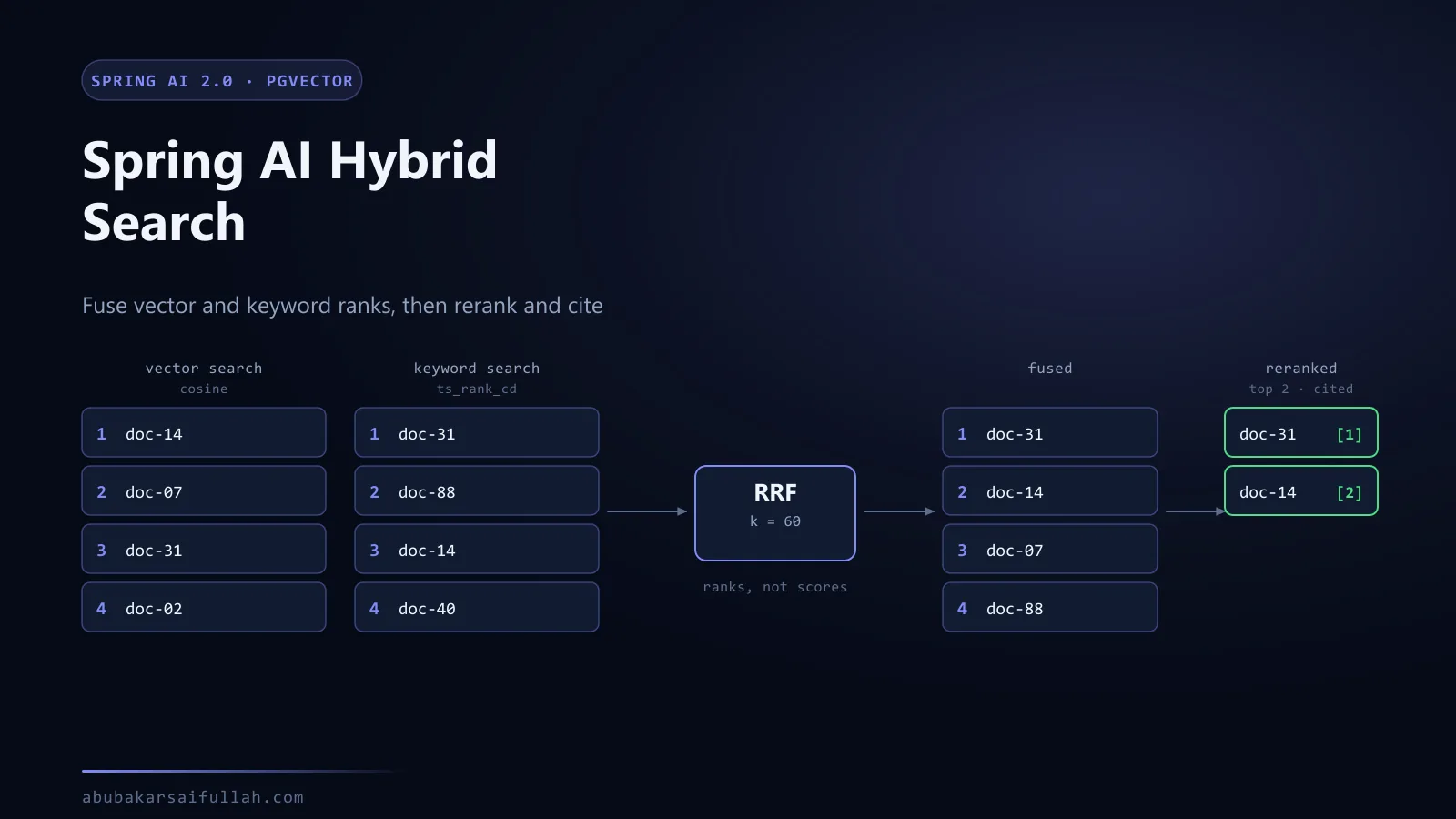
- Answers cite the wrong passage. Retrieval quality is the bottleneck, not the prompt. Hybrid search and reranking with Spring AI adds keyword search alongside vector search, fuses the two rankings, reranks a bounded candidate set, and measures the result before release.
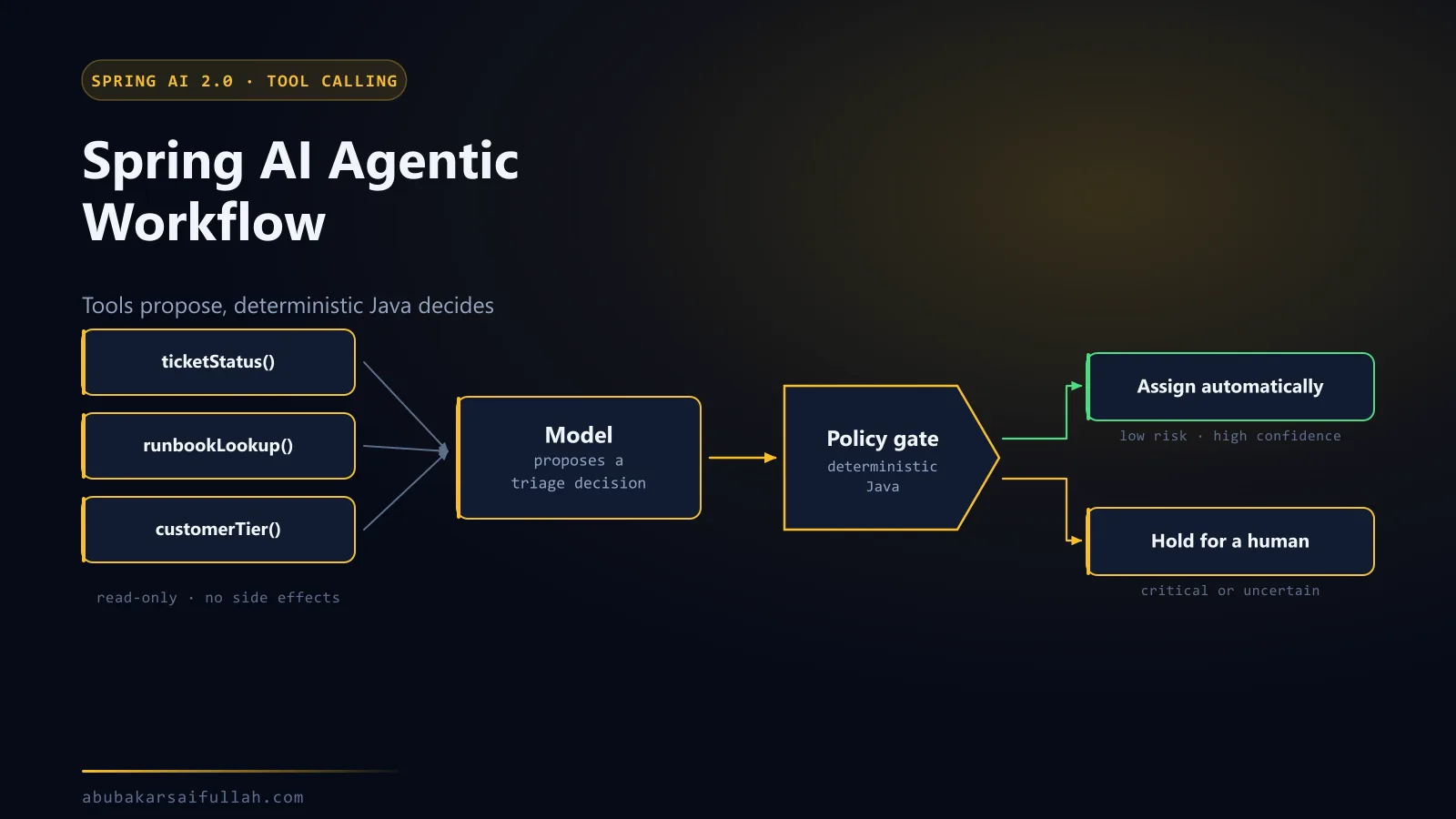
- The model needs to act, not just answer. Retrieval is read-only by design. A Spring AI agentic workflow adds tool calling and, more importantly, the deterministic policy that decides what the model is allowed to do with what it found.
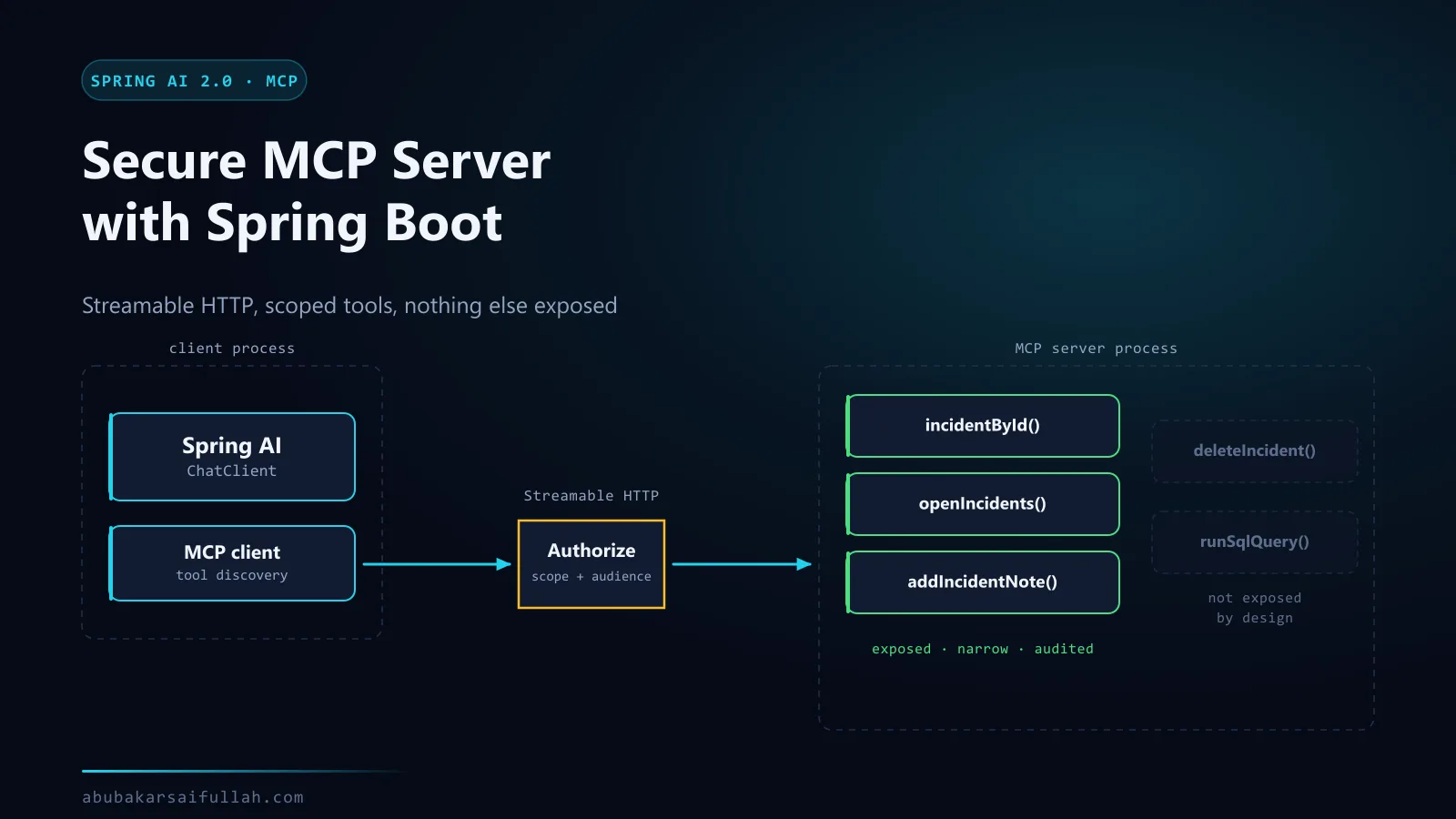
- Other applications need the same capability. Rather than duplicating retrieval, expose it once behind a secure MCP server and let multiple clients discover it.
- Ingestion outgrows a startup hook. Documents arriving continuously belong on a queue. The asynchronous Spring AI and Kafka pipeline covers retries, dead letters, and why a slow model call should never sit inside an HTTP request.
The related Applied AI with Spring AI project and skills overview provide portfolio context without changing the implementation shown here.
Frequently asked questions
Does RAG train or fine-tune the model?
No. This flow retrieves external passages at request time and places them in the prompt. Fine-tuning changes model behaviour through training; RAG changes the context supplied for a particular request.
Can I run this Spring AI RAG example with Ollama instead of OpenAI?
Yes, and no code changes. Both starters are on the classpath and spring.ai.model.chat plus spring.ai.model.embedding decide which one activates. Run with --spring.profiles.active=ollama after pulling a chat model and an embedding model. Remember that embeddings are provider-specific, so a persistent vector store would need re-ingesting.
Which Ollama models do I need?
Two, because a chat model cannot produce embeddings. This guide uses llama3.1 for chat and nomic-embed-text for embeddings. Pull both with ollama pull, and expect a lower similarity range from the local embedding model than from text-embedding-3-small.
What does the Spring AI RAG advisor actually do?
QuestionAnswerAdvisor performs the retrieval-and-augmentation step: it embeds the incoming question, searches the VectorStore, appends the matching passages to the user message, then calls the chat model. It does not handle ingestion, authorisation, or citation validation — those stay in your application code.
Can I use a different model provider?
Yes. Spring AI exposes common chat and embedding abstractions. Replace the model starter and its configuration, then verify model names, embedding dimensions, rate limits, and provider-specific behaviour.
Why not use SimpleVectorStore in production?
It is an in-memory demonstration and test implementation. Production systems usually need durable storage, concurrent scaling, backup, filtering, access controls, and operational monitoring.
Should the same embedding model be used for documents and queries?
Normally yes. Document and query vectors must share a compatible vector space. Changing the embedding model generally requires re-embedding existing documents.